Burning Money (Part 2)

My Orange phone bill came in a few days ago.

I really must stop calling all those sex chat-up lines…

OrangeBill 

I blame London.  I was there last month, and a friend and I came across this telephone booth.  I should point out that we were walking back from a restaurant in Mayfair to the hotel on Park Lane, so don’t be accusing me of straying off to some seedy part of London.  I should additionally point out that the image below is probably work-safe, as they’ve covered the nipples with stars and this was, after all, in a public phone box!

DSC03184

So…

Copious Quantities of Japanese Sake + Ridiculous Hotel Cocktails + Wallpapers of Porn Phone Numbers = Regrettable Mobile Bill Hangover


Oh – and I’m particularly amused that BT have a “how was it for you?” sticker in the phone box (to the left of the phone)…  With hindsight, I should really have used that payphone rather than my mobile…

Burning money (Part 1)

As folk may (or may not) know, I currently drive an incredibly ridiculous car – the Audi RS 6.  Everything about the car is excessively stupid for what I desperately keep claiming(/justifying) is a family estate car.

5.0 litre V10 twin-turbo.  572bhp.  0-62mph in 4.6 seconds.  650Nm torque (and delivered pretty much in a straight line, rather than a curve – see the chart a bit down this page).  Near £100,000 price tag (thanks to silly amount of pointless optional extras like the £6,000 ceramic brakes).  All wrapped up in an unassumingly plain family estate car (well, that’s what I say, anyway).

Not that there aren’t greater things to complain about, but the car does have it’s downside.  The 333g/km CO2 emissions, for one (to contrast, the emissions from the friend-of-the-green-brigade Toyota Prius is 89g/km).  Every time I drive the car, I probably pump out enough emissions to melt a polar icecap somewhere, or choke dead an innocent baby seal.

Unfortunately, the sheer petrol-thirst of the car is also hitting the wallet.  The evidence:

DSC03254

That’s for a full tank of petrol.  £95 (or $145 to my American friends)!  For 80 litres.  To put this in context – that will last me approximately 1 week of normal commuting.  Or a single return journey from Aberdeen to Edinburgh (that’s a 250 mile round-trip).  Yep – the 15-20 mpg fuel consumption certainly takes its toll.

Having said that – the car is fun.  Oh, dear goodness, it’s sheer, ridiculous fun.  I’m just over 1.5 years of ownership, and it still provides childish glee.

But…  My reality-check is kicking in.  And despite the childish glee, I’m starting to wonder whether it really is worth all the utter excessiveness.  I love my toy.  But it really is an utterly pointless, excessive, expensive, unjustifiable toy.  But, it’s fun

Buyer’s remorse.  Gah!

My (New) Definitive Music Library

Many moons ago (back in the Windows XP days), I decided to rip my entire music CD collection to a digital file format.  I made the decision to go for the Windows Media Audio format, as I was both a keen Microsoft fanboy and also because I was a wannabe audiophile.  At the time, the WMA format was much further advanced than the standard MP3 format, allowing higher aural fidelity at the same or smaller bit-rate (better quality at smaller file size).

Hard disk storage space (and device compatibility) were constraints back then, so I ripped music at WMA v9 192kbps – quite a high quality at the time.  Over 500+ CDs from my collection were painstakingly and laboriously ripped.

However, time marches on and I now own a [shiny new MP3 player] which supports newer and better audio formats.  After much pondering, I’ve decided to go through the whole process of re-ripping my entire music collection once more.  Look at the stacks that I need to wade through…!

DSC03251

Lesson learned, though.  Storage is now incredibly cheap, so I’m going to use the Windows Media Audio Lossless format, basically creating a new music collection at CD quality, with no loss of fidelity at all.

This master library is going to be stored on my Windows Home Server, which allows me to access my music on my home network through my various Tablet PCs, the Xbox 360 and the dedicated Windows Media Center connected to my TV and hi-fi system.

In addition, the entire library is automatically re-encoded to WMA Pro (at 128kpbs) on the Windows Media Center, which is then automatically synched to my Live Mesh setup – this is then funnelled down to my day-to-day Tablet PC (the HP EliteBook 2730p) which then pumps the music wirelessly to my Zune HD.

So – I’m hopefully future-proofed.  As audio formats march on and get better, I can simply change the automatic re-encode process to a newer music format (or eventually just use the lossless format once technology reaches the stage of being able to hold 500GB of music on tiny MP3 player devices) and I’ll will be reassured that everything gets automatically and seamlessly updated across all my PCs and music devices.

Huzzah!

New Toy Alert: Zune HD

Given the recent excitement about Microsoft’s new phone OS (a topic for a future blog, but more details at Engadget), I simply had to get my hands on Microsoft’s latest MP3 Player, the Zune HD.  If you’re wondering what the link is, then I should point out that the user interface for the next version of Windows Phone is very similar to the interface in the Zune HD, hence my curiosity.  Indeed – it appears that the Zune team have been subsumed into the Windows Phone team (or is it the other way around), and there is a very strong scent of Zune pervading through the new phone release.

Anyway – back to my toy…

DSC03227

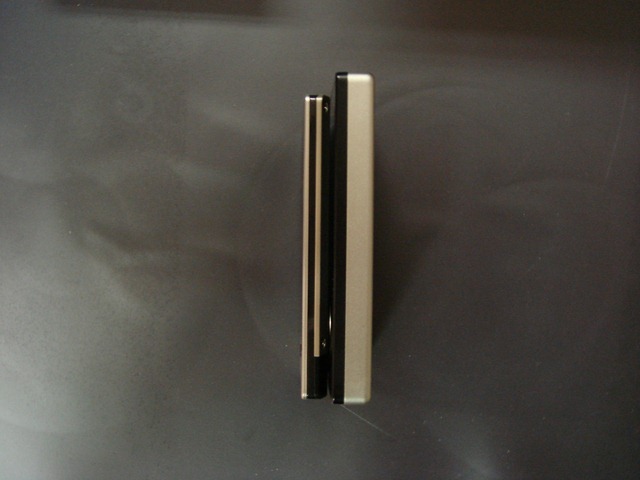
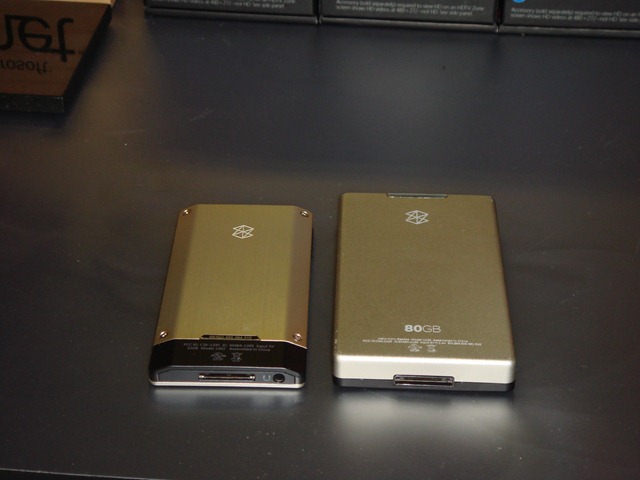
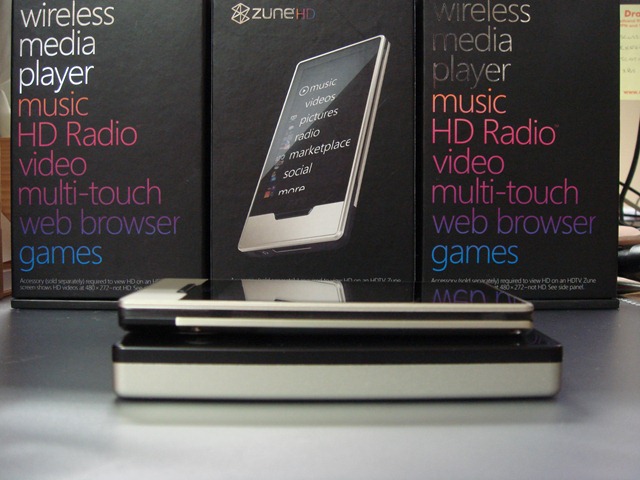
If you’re wondering, here’s how it compares in size to a Zune 80:

DSC03231 DSC03232 DSC03236  DSC03241 DSC03245

There are videos all over the place on how the user interface works, but the thing that impresses me most is the “connectedness” and pervasive content in these devices.

On my Zune HD, I merely uploaded my music collection onto the device.  It then worked out who the artists were, downloaded photos and biographies, and also linked to other albums by the same artists, as well as recommending similar artists.  It’s nice to have that info all on the device, without actually being connected to the Internet at that time.

OK – so the Zune HD has been out for a while now (launched nearly 6 months ago, back in Sep 09)…  But as it’s only available in the US and Canada, it’s hardly a surprise that it’s taken a while for me to get my hands on one (a big thanks to one of the peeps at Micropack (one of our clients) who brought three of these units back to the UK for me).

Dead Plumbers

I saw this sinister message at the bottom of a Windows Live Messenger window this morning:

Dead Plumbers

It’s somewhat weird to be told by Messenger that each week, approximately 4 plumbers will die.  Eek!

However, it’s just a scare advert for the HSE’s asbestos awareness drive.  Certainly worked, though!

Reorganising Photos

I’ve had a couple of false starts when trying to reorganise and upload photos…  However, third time lucky?

I’ve nailed down a fairly robust workflow for processing all of my photos now – it’ll just take some time to carry out.

I have been organised enough to arrange my photos into grouped events based on dates (for instance, ECTS 2000 on the 03rd September 2000), so it’s just a case of processing these batches one at a time…

First, I use Windows Live Photo Gallery to rotate photos, perform basic photo clean ups (such as removing red-eye) and add the basic metadata – that is, apply some People Tags, other Descriptive Tags and perhaps a few captions.

Windows Live Photo Gallery

I then reload the batch of images in Microsoft Expression Media 2 – this handy application allows me to add some geotag data to relevant photos.  I do particularly like Expression Media, as the app opens a Bing Maps window where I can just drag and drop my photos onto a geographic location.  This tags my photos with a set of GPS co-ordinates.

Expression Media 2

I then take those GPS tagged photos and run them through Microsoft Pro Photo Tools 2, which has a handy feature that resolves GPS co-ordinates with Location Information, such as the City, State/Region, Country, etc.

Pro Photo Tools 2

Finally, I come back into Windows Live Photo Gallery to upload the photo batch into my Windows Live SkyDrive as part of my photo collection.

WLPG Publishing

Phew!  That’s one folder down – only a couple of hundred to go…

Hello to the New Decade

As I crawl out from under my rock and blink at the bright sky above, I stumble into the inevitable realisation that – regardless of how hard I fight against the tide – I cannot hide from the Social 2.0 wave indefinitely.  Despite taking nearly a whole lazy year off from blogging, I find that the rest of the world has moved ever onwards.  Blogs are almost passé, an unfashionable method of monologue that has been superseded by the rise of the socially interactive Twitter and Facebook.

Over the past decade, I have long tried to separate my social and business lives – after all, the two spheres I have created could hardly be more diverse!  However, the pace of technology and social networking makes the task of keeping these two worlds apart an increasingly difficult task.

Microsoft has, over nearly two decades, provided me with great technical direction.  I connected with “computer technology” back in 1994, when I was a mere 15 years old.  Although my computing era started in the days of the Sinclair ZX Spectrum +2, computers became more than a mere mechanism for videogames when I was given my first computer – a notebook (with Intel 386SX processor) running Microsoft Windows 3.1.  Cemented by the launch of Windows 95 a mere year later, I was propelled into a passion for technology, guided mainly by Microsoft.

Microsoft has not only introduced me to my first experience with computers, but also allowed me to connect to the Internet in the early days (MSN was my first dial-up Internet Service Provider).  My home cinema and music/photo/media collection is powered exclusively by Microsoft technologies, my last two decades of work crafted on Microsoft products.  In fact, I owe my career and my last decade of income to the ecosystem that Microsoft has created – the company I started a decade ago exclusively focussing on consultancy around Microsoft products.  My personal, work, mobile and gaming experiences are all provided by Microsoft.

It is appropriate, therefore, that I should choose to embrace the available social networking technologies as they start to permeate into Microsoft technologies.  Although Microsoft has been encouraging social networking for the last few years, I believe that 2010 sees the advent of social technologies being widely adopted into the majority of its products.  Microsoft Outlook 2010 introduces the Outlook Social Connector, and the recently-announced Windows Mobile 7 Series demonstrates the omnipresence that social networking has in our day-to-day lives today.

As Microsoft have now provided the tools for me to immerse myself in this world of social networking, I have made the decision – after years of actively avoiding it – to embrace the Social 2.0 wave.  Blogging here on Windows Live Spaces will still be my main avenue to communicating with the world at large (my lengthy monologues allow me to hear the beautiful sound of my own voice in my head), but I will also be starting to Twitter, to accept friends on Facebook, and to start re-tagging and geotag my photos for online access to all.

In short, I will finally be merging my social and business lives together…

This promises to be an interesting experience…!  🙂

Despite all that, though, I still choose not to completely open my kimono at this stage, and to hide behind the safety of my South Park avatar!

SP Stan

Where’s My Blog, You Ask…?

Well, you probably didn’t.
 
But you’ll find my blog at RandomStan, in case you were wondering…